Your Privacy Choices
As described in our Privacy Policy, we collect personal information from your interactions with us and our website, including through cookies and similar technologies. We may also share this personal information with third parties, including advertising partners. We do this in order to show you ads on other websites that are more relevant to your interests and for other reasons outlined in our privacy policy.
Sharing of personal information for targeted advertising based on your interaction on different websites may be considered "sales", "sharing", or "targeted advertising" under certain U.S. state privacy laws. Depending on where you live, you may have the right to opt out of these activities. If you would like to exercise this opt-out right, please follow the instructions below.
If you visit our website with the Global Privacy Control opt-out preference signal enabled, depending on where you are, we will treat this as a request to opt-out of activity that may be considered a “sale” or “sharing” of personal information or other uses that may be considered targeted advertising for the device and browser you used to visit our website.
How to Use Your Tour Caddy
Watch the video above, then use this simple guide as your on-range cheat sheet.
Tour Caddy at a Glance
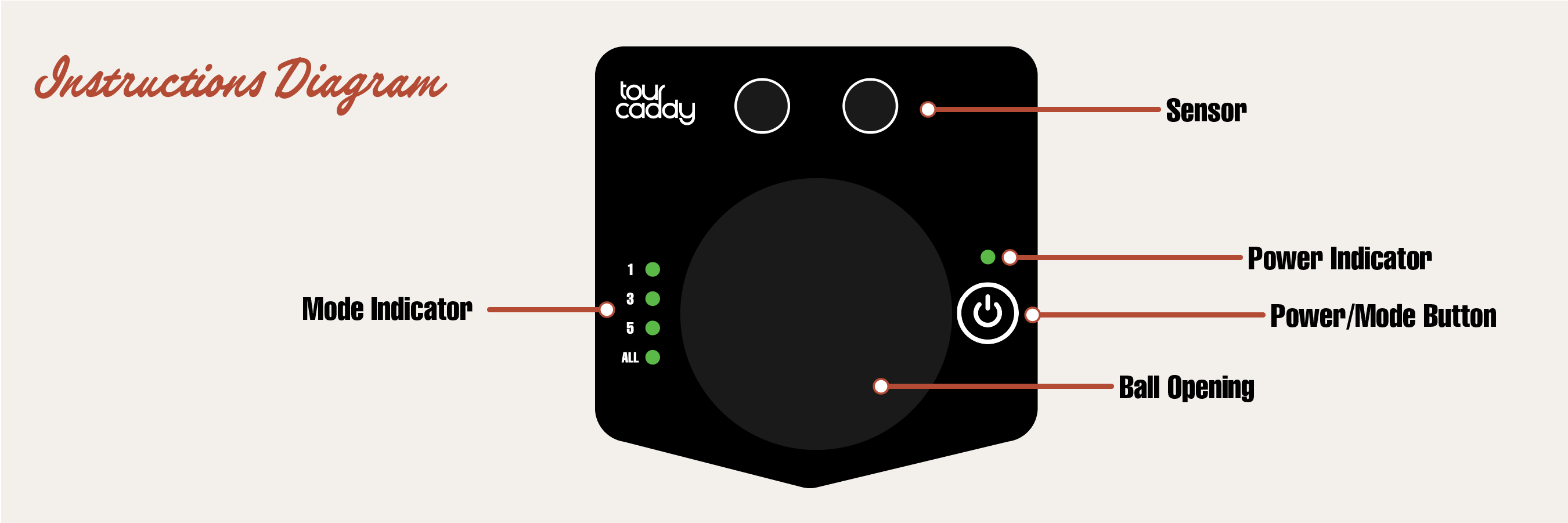
Everything is controlled with one button and a simple set of lights on the front.
- Sensor – Wave your club in front to get balls.
- Ball opening – Where the balls come out.
- Power / Mode button – Turns the unit on and off, and selects how many balls you get.
- Row of 4 lights – Shows your ball mode and a few status alerts.
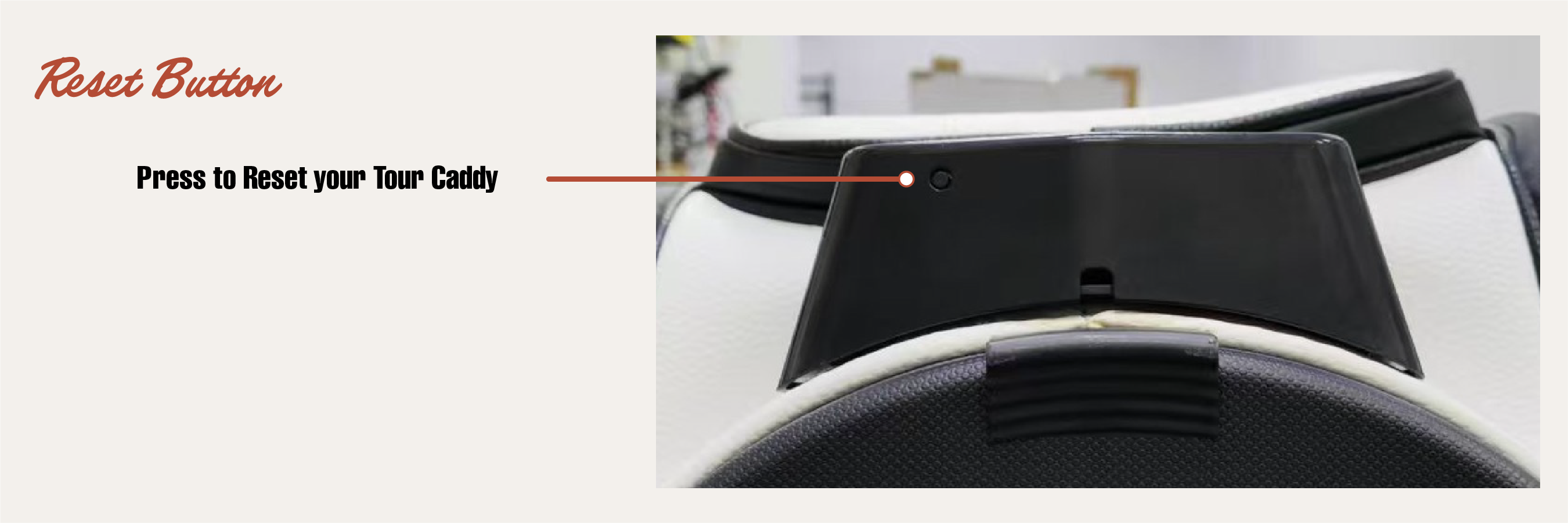
- Reset button – If the unit is acting up, there’s a reset button on the underside of the sensor face.
Quick Start
- Set up your Tour Caddy. Place it in front of your mat and fill it with balls.
- Turn it on. Press the button once. A light will come on to show it’s awake.
- Pick your ball mode. Press the button again to cycle through:
- 1 Ball Mode – For focused, one-at-a-time practice.
- 3 Ball Mode – A small stack ready for faster reps.
- 5 Ball Mode – A bigger pile when you want to rip through a set.
- All Dispense Mode – Hold down the power button until the lights are flashing. This will dispense all golf balls until the unit is empty.
- Confirm your mode. Wave your club in front of the sensor once. The lights will stop “cycling” and settle on the mode you chose.
- Start hitting. Each time you wave your club in front of the sensor, Tour Caddy drops your selected number of balls.
Ball Modes & Lights
The front lights make it easy to see how many balls you’ll get with each wave of the club.
| Ball Mode | What You’ll See | What It Does |
|---|---|---|
| 1 Ball Mode | First light highlighted | Drops 1 ball each time you wave your club. |
| 3 Ball Mode | First 3 lights highlighted | Drops 3 balls for a small pile at your feet. |
| 5 Ball Mode | All 4 lights highlighted (to show maximum mode) | Drops 5 balls for a bigger pile when you’re in a groove. |
| All Dispense Mode | Lights flashing | Dispenses all golf balls until the unit is empty. |
After balls are released, the sensor pauses briefly so it doesn’t keep dropping balls while you’re swinging.
Power & Charging
Turning On & Off
- Turn on: Press the button once. A light will come on.
- Turn off: Click the button to cycle past 5 Ball Mode and it will turn off (keep cycling through the modes).
- Auto sleep: If you forget to turn it off, Tour Caddy will eventually put itself to sleep to save battery.
Charging
- The charging input is inside the front pocket zipper.
- A light will show that it’s charging.
- When it’s fully charged, the light will turn solid.
- Use it unplugged on the range once it’s charged.
Low Battery
- If you see a red or “warning” light when you turn it on, it’s time to charge.
- If it won’t stay on, the battery is too low—charge it fully and try again.
Troubleshooting
- If you’re having trouble, press the reset button on the underside of the sensor face.
Quick Tips
- Wave your club calmly in front of the sensor—no need to swing hard at it.
- Make sure there are always balls in the hopper so Tour Caddy can feed properly.
- Pick 1 Ball Mode when you’re working on precision; use 3 or 5 balls when you’re grooving a feel.